 Communications
Video Conferencing Rooms
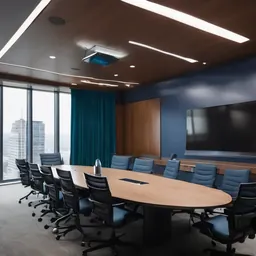
Teams, Zoom and Google Meet rooms that start with one tap, with cameras, mics, speakers and displays chosen for the room's size and acoustics.

What we usually find on site
Meetings with site, branches or overseas partners start ten minutes late: someone hunts for an HDMI cable, the laptop won't show on screen, and the far end says all they hear is echo. Executives sit waiting while partners watch.
Designed for the room size
| Room type | People | Typical equipment |
|---|---|---|
| Huddle | 2–6 | All-in-one video bar |
| Medium | 6–12 | Video bar plus table microphone extensions |
| Boardroom | 12–30 | Multiple PTZ cameras, ceiling or table mics, DSP |
A video bar's microphones typically pick up well to about 3–4 metres. On a longer table, people at the far end sound as if they are in a bucket unless you add extension mics.
Platforms
We install certified Microsoft Teams Rooms, Zoom Rooms and Google Meet hardware, or BYOD rooms where a laptop connects with a single USB-C cable. If the organization standardizes on one platform, a dedicated room system pays off fastest: tap the touch panel and you are in.
Audio matters more than video
People tolerate a soft picture; they do not tolerate bad sound. Many new Vientiane meeting rooms have glass walls, tiled floors and hard ceilings that bounce sound everywhere. We assess the room first, recommend absorption panels or curtains, then tune echo cancellation. The network needs enough bandwidth and QoS, especially when the whole building shares one internet link.
Send us a photo of the room and the seat count, and we will recommend a kit and tell you whether the acoustics need work.
What it does
One-touch join
The calendar shows on a touch panel; tap to join.
Speaker tracking
AI cameras frame the speaker or the whole group automatically.
Clear audio
Beamforming mics, echo cancellation and suppression of AC hum and typing.
Wireless sharing
Share a laptop screen without hunting for an HDMI cable.
Remote management
Monitor and update every room from a central console.
Design and rollout
- 1
Survey the room: size, lighting, reverberation, power and data points.
- 2
Choose platform (Teams/Zoom/Meet/BYOD) and equipment.
- 3
Mount displays, cameras and mics with clean cable management.
- 4
Configure room accounts, calendars and network QoS.
- 5
Run live test calls to a branch and train users.
Where it fits
- Boardrooms meeting shareholders and Thai/Chinese partners.
- Mining companies holding daily site-to-Vientiane meetings.
- Universities running hybrid lectures and seminars.
- Government agencies conferencing with provincial offices.
Typical system sizes
Meeting Room
Fits: 6–12 people
- Teams/Zoom Rooms with touch panel
- Extension mics and wireless sharing
- Dual displays
Boardroom
Fits: 12–30 people
- Multiple PTZ cameras and DSP
- Ceiling or delegate microphones
- Acoustic treatment recommendations
Brands we supply & install
All brand names and trademarks belong to their respective owners. Mention does not imply official partnership unless explicitly stated. Products are sourced through legitimate distribution channels.
FAQ
How much bandwidth does a room need?
A typical HD call uses about 1.5–4 Mbps each way, depending on platform and layout. Watch the upload side, which in Laos is often much smaller than download. Leave headroom and set QoS.
Can one room do both Teams and Zoom?
Yes. Many room systems support Direct Guest Join into the other platform's meetings, or you can plug in a laptop BYOD-style.
Do we need a room licence?
Dedicated Teams Rooms and Zoom Rooms need a room licence separate from user licences. We advise on the right one and confirm with the vendor before quoting.
Related guides
Internet Redundancy with Dual ISPs: When the Fiber Gets Cut
Failover or load balancing, how to pick two providers that won't fail together, the equipment you need, and how to test failover so you know it really works.
Microsoft 365 or Google Workspace: How Does Your Organisation Actually Work?
Email, documents, collaboration, security and device management compared, plus what to check before migrating, starting with who controls your domain's DNS.
Related solutions
Communications
 IP-PBX & VoIP Phone SystemBusiness IP-PBX: extensions, trilingual IVR, call transfer, recording and internal calls between Lao and Thai branches over VPN.
 Public Address SystemIP or 100V paging and background music for factories, schools, hotels and sites, with zoned emergency announcements.
 Contact CenterContact center with ACD queues, IVR, recording, live dashboards and chat for banks, hospitals, logistics and customer service…
Send us a floor plan or a few photos of the site
We’ll come back with a few questions, then a first design. The first consultation is free, in Lao, Thai or English, on WhatsApp or our Facebook page.