On this page
- Start with questions, not brands
- Topology: let size decide
- Cabling and racks: the hardest things to change later
- VLANs and a written IP plan
- Wi-Fi by headcount, not by square metre
- Firewall and internet
- Power and heat
- Before you sign off the design
- What we usually find on rescue jobs
- You don't have to buy it all in one year
- Our view for Lao organizations
- Start with your floor plan
Most office networks we're called in to fix were never designed. They grew. It starts with the ISP's router, then a cheap switch, then another one under the accounts desk, then a few consumer Wi-Fi routers from the market. Three years later nobody knows which cable goes where, and the internet crawls every afternoon.
Real design work takes a few days. It decides whether the network runs well for 7–10 years or needs fixing every year. This is the order we work in.
Start with questions, not brands
Before opening any datasheet, we ask:
- How many staff today, and how many in 3–5 years?
- Devices per person: laptop, phone, tablet. Usually 2–3
- Anything else on the network: IP cameras, IP phones, fingerprint/face terminals, printers?
- Which applications can't go down: ERP, accounting, Microsoft 365 or Google Workspace, video meetings?
- Any provincial branches? Anyone working from home?
- Do you own the building or rent? If you rent, will the landlord allow drilling and conduit?
That last question sounds minor but can change the whole design. Plenty of rented buildings in Vientiane don't allow drilling, so we use surface trunking instead.
Topology: let size decide
| Office size | What we recommend |
|---|---|
| Under 50 users, one floor | Collapsed core: firewall + one switch (or a stacked pair) in one rack |
| 50–300 users, several floors | Layer 3 core switch in the server room + access switch per floor, fiber uplinks |
| Several buildings / plant | Redundant core pair + distribution per building + fiber backbone |
For offices under 50 people we'd skip a separate core switch. That money does more good in a better UPS or a second internet line.
Worked example: 120 people on three floors
Each floor has 40 staff. Per floor we count 40 desk outlets, plus 20% spare (8), 4 Wi-Fi APs, 3 cameras, 2 printers and a meeting-room display: about 58 ports. That is two 48-port access switches per floor, stacked or managed as one, with two fiber uplinks to the core. If the floor also has 20 IP phones (around 5 W each), 4 APs (around 20 W each) and 3 cameras (around 8 W each), the PoE load is roughly 100 + 80 + 24 = 204 W. Check the switch's total PoE budget, not just whether each port supports PoE. The PoE budget calculator does this per switch. In the server room, the Layer 3 core needs at least six 10 GbE fiber ports for the three floors, plus ports for servers, the firewall and growth.
Cabling and racks: the hardest things to change later
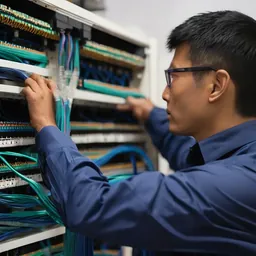
- Cat6 as the minimum. Channel length up to 100 m (90 m permanent link + 10 m of patch cords in total)
- For drops feeding Wi-Fi 6/6E/7 APs with 2.5G or faster ports, consider Cat6A, especially if you want 5G or 10G headroom later
- Fiber between floors and between buildings
- Add 20–30% spare outlets. A drop pulled during fit-out costs a fraction of one added later
- Label both ends of every cable, and certify the cabling with a proper tester, not a cheap blinking-light continuity checker
VLANs and a written IP plan
Separate traffic by function: staff, servers, CCTV, voice, guest Wi-Fi and device management. Each VLAN gets its own subnet, and the plan is written down. Control inter-VLAN traffic with firewall policy or ACLs rather than letting everything talk to everything.
The practical reason: if one PC gets ransomware, it should not be able to reach the NVR or the accounting server directly.
A starting plan for that 120-person office might look like this:
| VLAN | Use | Subnet size | Why that size |
|---|---|---|---|
| 10 | Staff wired and Wi-Fi | /23 (510 addresses) | 120 people × 2–3 devices, plus growth |
| 20 | Servers | /26 | Static addresses, documented one by one |
| 30 | IP phones | /25 | One per desk, plus spares |
| 40 | CCTV and NVR | /25 | No internet access at all |
| 50 | Guest Wi-Fi | /23 | Internet only, client isolation |
| 99 | Switch and AP management | /27 | IT staff only |
Our VLAN basics guide explains how traffic between these VLANs is controlled.
Wi-Fi by headcount, not by square metre
A 30-seat meeting room needs more access points than an archive room three times its size. Survey before you drill, and use centrally managed APs (controller or cloud). For a rough first number, try our Wi-Fi AP estimator.
Firewall and internet
Use a next-generation firewall with IPS, web filtering and VPN. Size it on throughput with all security features enabled (usually labelled threat protection or NGFW throughput). The big firewall throughput figure on the front of the datasheet is measured with no inspection at all and can be 5–10 times higher than what you'll get in real use.
Two internet links from different providers pay for themselves in almost any office that relies on cloud services. Check that both lines don't arrive on the same pole.
More detail in our guides on sizing a firewall and dual internet links.
Power and heat
Brownouts and outages are normal in many parts of Laos, especially in the evening peak. Put the core rack on an online (double-conversion) UPS, and include the PoE load the switches deliver to cameras and APs when you size it. The server room needs air conditioning, ideally two units on alternation. A single unit that fails in April can push the room past 40°C within a few hours.
Worked example: UPS for the core rack
The core rack holds the firewall, the core switch, two servers and a NAS, drawing about 900 W, plus a floor switch in the same rack delivering 204 W of PoE. That's roughly 1.1 kW of real load. A 3 kVA online UPS keeps it well under 50% load, which leaves room for growth and gives longer runtime from the same batteries. If you want 30 minutes rather than 10, you'll need extra battery packs; work out the figure with our UPS runtime calculator and the UPS sizing guide.
Before you sign off the design
- Logical and physical network diagrams
- Documented VLAN/IP plan
- PoE budget calculated
- Uplinks and redundancy defined
- UPS plan with target runtime
- Monitoring and configuration backup in place
- Cable test results for every outlet, handed over with the drawings
- Admin passwords stored in a company-owned vault, not with the installer
What we usually find on rescue jobs
Everything on one VLAN, with 40 cameras mixed in with staff PCs. Unmanaged switches daisy-chained, with a loop nobody knows about. APs mounted where drilling was easy rather than where people sit. The PoE switch that powers the cameras isn't on a UPS. And most often of all: no documentation. When the previous technician left, the passwords left with him.
You don't have to buy it all in one year
| Phase | What to invest in | Why |
|---|---|---|
| Phase 1 | Cabling, racks, UPS, firewall, core switch | The foundation, hard to change later |
| Phase 2 | Access switches, Wi-Fi, VLAN segmentation | Scales with headcount |
| Phase 3 | Backup internet, monitoring, NAC | Adds resilience and security |
When comparing quotations, look at total cost of ownership over the system's life: annual licences, warranty, maintenance contracts and electricity. A cheaper switch with no firmware updates or local spare parts often costs more over five years than a better-supported one.
Our view for Lao organizations
Choose brands with spare parts and warranty support through Thai distributors. A unit that has to go back to the manufacturer's country can take weeks; from Thailand it usually crosses in a few days plus customs clearance. If you have provincial branches, cloud-managed platforms save a lot of technician travel. And keep documentation in Lao and English so your in-house IT team can actually use it.
Thunderstorms in the rainy season are hard on copper. Use fiber, not copper, between buildings, since glass doesn't carry a lightning surge from one building's earth to the other, and fit surge protection on cable runs to outdoor cameras and APs. A surge that travels down a camera cable can take out the PoE switch and every device on it.
Start with your floor plan
Send us your floor plan (a phone photo or PDF is fine) and your headcount. We'll mark rack locations, cable routes and first-pass AP positions before we book a site survey.
- #lan
- #network design
- #office
- #vlan
- #cabling
- #firewall
- #ups